Free Forever · No Credit Card

Free Accessibility Widget for Your Website

Help your visitors customize their browsing experience with adjustable font sizes, contrast, and more, 100% free, forever.

No heavy manipulation ~100kb lightweight
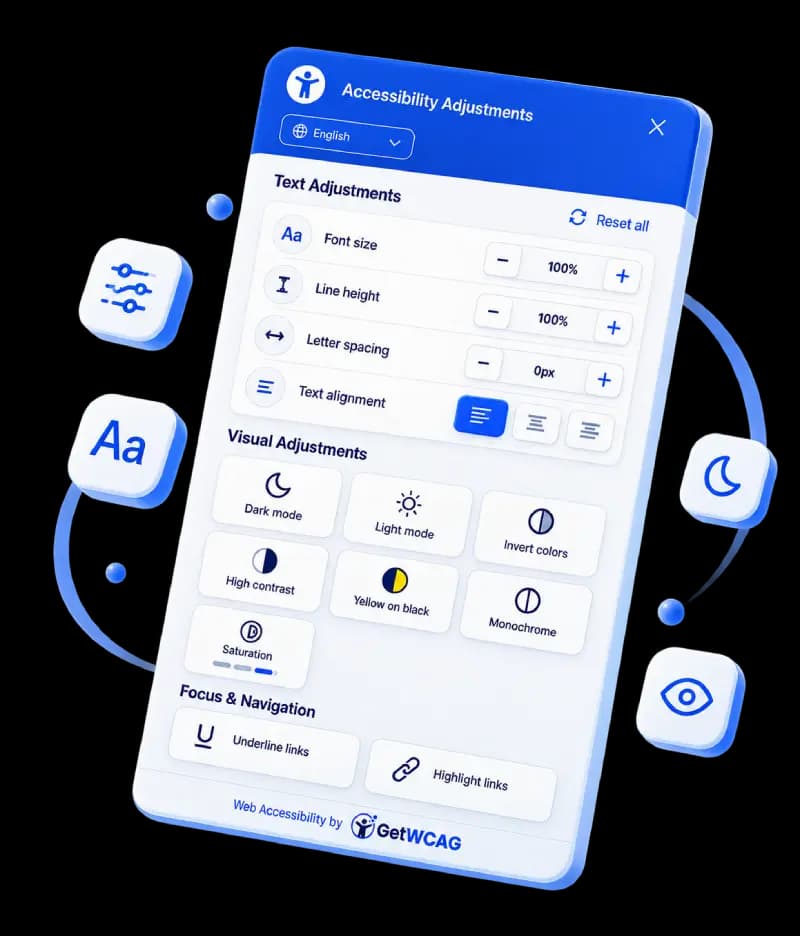
Preview of the GetWCAG accessibility widget

Looking for an accessibility widget for your website?

What this gives you: Visitor-facing controls for text size, spacing, and contrast across multiple languages.

What it does not do: It does not replace WCAG remediation, manual audits, or legal accountability.

What to do next: Pair the widget with a scan and fix the issues it cannot solve.

Recommended next step: run an accessibility scanner for websites and validate color combinations with our WCAG contrast checker.

Web Accessibility Widget vs Website Accessibility Widget

In search, these phrases usually point to the same goal: a visitor-facing accessibility widget for website controls. Both terms refer to tools that adjust readability settings such as text size and contrast.

If you are evaluating an accessibility widget for website use, compare setup speed, language support, performance impact, and how clearly the vendor explains what the widget cannot solve.

ADA Compliance Widget: What It Helps With

An ADA compliance widget can improve on-page usability controls, but it does not replace code-level accessibility fixes. Teams often use a free ADA widget to support users immediately while engineering resolves structural WCAG issues.

Recommended path: deploy widget controls, then run an accessibility scanner and prioritize remediation backlog items.

Why Use an Accessibility Widget?

Not everyone experiences the web the same way. Visitors with disabilities or situational needs often require higher contrast, larger text, or different alignment to navigate comfortably. Our widget gives them control, with just one line of code added to your site.

How It Works

A lightweight, responsive widget visitors can activate and adjust, no maintenance on your end.

01

Add the Widget

Copy and paste a single line of code into your site, no developer needed.

02

Visitors Adjust

Users adjust font size, spacing, contrast, alignment, and more to suit them.

03

Continue Improving

Scan your site for deeper issues and fix them to achieve WCAG/EAA conformance.

⚠️

A Widget Helps, But Doesn’t Solve Everything

While our widget makes it easier for visitors to adapt your site to their needs, it does not make your website fully compliant to WCAG or the European Accessibility Act. Compliance and conformance require fixing structural, semantic, and code-level issues that the widget cannot address.

That’s why we recommend you also run a full accessibility scan of your site and fix any detected barriers. The widget is a helpful tool, but it’s only part of the bigger picture.

Supported Languages

Our widget is available in multiple languages to serve visitors from around the world. Visitors can choose their preferred language, and the admin can set the initial language in the widget settings.

BulgarianCroatianCzechDanishDutchEnglishEstonianFinnishFrenchGermanGreekHungarianIrishItalianLatvianLithuanianMalteseNorwegianPolishPortugueseRomanianSlovakSlovenianSpanishSwedish

Open Source Accessibility Widget vs Managed Widget

If you are searching for an open source accessibility widget, the tradeoff is usually speed versus maintenance ownership. Open-source options can be flexible, while managed widgets can reduce operational overhead for updates and support.

  • Open source: more customization, more in-house upkeep.
  • Managed: faster launch, vendor-led updates and guidance.
  • In both cases, widget controls should be paired with WCAG remediation work.

Accessibility Widget for Website Setup (React, CMS, Custom)

For teams looking for a React accessibility widget or a generic website accessibility widget, deployment is usually script-based and framework-agnostic.

  • React/Next.js: add the script once in the root layout.
  • WordPress/Shopify/Webflow: inject the script in the global theme.
  • Custom stack: place the script before the closing body tag.

Then validate UI contrast and interaction states with the WCAG contrast checker .

Scan Your Site for Full Accessibility

Ready to go beyond a widget? Use GetWCAG’s accessibility scanner to detect structural, visual, and code-level barriers on your site. Fix these to achieve WCAG 2.2 and EAA compliance.

Run a Free Scan

Get Your Free Widget Today

Help visitors adjust your website and take the first step towards a more inclusive web.

Install Free Widget

Free forever · No credit card required

Frequently Asked Questions

The GetWCAG widget allows visitors to adjust text size, contrast, highlight links, and more, helping them navigate your site more comfortably.

Free Accessibility Widget for Websites | Web Accessibility & ADA